“Just retry it” is the most expensive sentence in distributed systems.
It sounds simple. But buried inside it is a question nobody answers upfront: retry what, exactly? The whole request? The step that failed? With what backoff? For how long? What if the step already partially succeeded? What if your process died mid-retry and you don’t know? What if two retries ran at the same time and both wrote to the database?
For a while at Refold, we answered these questions ad hoc: per job, per engineer, with varying degrees of correctness. It worked until it didn’t.
This post is about Temporal: what it actually is, the patterns we use every day, why we chose it over the alternatives, how we deploy it, and why I think it’s the right substrate for a certain class of problems, including, increasingly, AI agent workflows.
What durable execution actually means
Most backend systems are stateless by design. A request comes in, you do some work, you return a response. If something fails, the caller retries. Clean and simple.
The problem is that not all work fits in a single request. Some processes are inherently long-running and asynchronous, and they span seconds, minutes, or even days. They wait on external events. They involve multiple steps where each step might fail independently. Integration workflows are a good example: a sync pipeline might authenticate with an external API, paginate through records, transform data, write to a destination, and schedule a follow-up. Each step is a potential failure point, and the whole thing needs to be resumable if anything goes wrong mid-way.
The traditional answer is a job queue. You break the work into steps, enqueue jobs, and process them with workers. This works for simple cases. It falls apart when:
- A worker crashes mid-step and the job silently disappears
- You need to know where in a multi-step process a job currently is
- Steps have dependencies and you’re hand-rolling DAG (workflow) logic in application code
- You need to wait for an external event (a webhook, a user action) and resume from where you left off
- Your retry logic is copy-pasted boilerplate across a dozen job types
Durable execution is the answer to this class of problems. The idea: you write code that looks like normal sequential code, and the execution engine makes it durable, automatically persisting state, replaying from failures, and resuming exactly where it left off, even if the underlying process is killed.
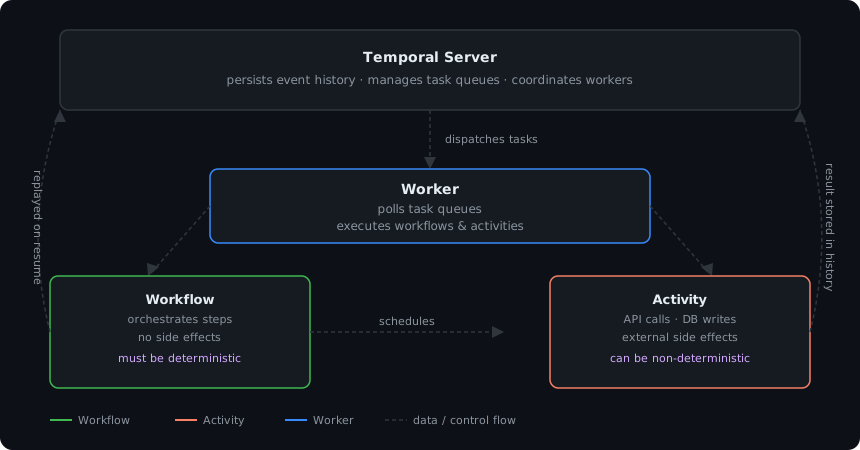
Temporal is the most mature, production-proven implementation of this idea. The mental model is:
- Workflow: the orchestrator. Defines the steps, their order, and the control flow. Must be deterministic, more on this later.
- Activity: a single unit of work with side effects (database writes, API calls, anything that touches the outside world). Activities can fail and be retried independently. These can be non-deterministic.
- Worker: your process that polls Temporal’s task queue and executes workflows and activities.
- Temporal Server: the durable engine that persists execution state as an event log and coordinates workers.
The key insight is that the workflow function itself never actually does anything, it only orchestrates. All real work happens in activities. This separation is what makes replay possible.
Why this is exactly right for AI agents
AI agent workflows are the most natural fit for durable execution I’ve seen.
An agent task typically looks like: receive a goal, plan a set of steps, call a tool, process the result, maybe call another tool, wait for something, loop. It can run for minutes or hours. LLM calls are unreliable and slow. Tool calls might hit rate limits or fail. The user might need to approve an intermediate step before the agent continues.
This is a durable execution problem wearing a different hat.
In Temporal, an AI agent maps cleanly:
// Each LLM call is an Activity (retriable, observable, isolated)
const plan = await workflow.executeActivity(callLLM, {
  startToCloseTimeout: "2 minutes",
  retry: { maximumAttempts: 3 },
});

// Tool calls are Activities too, with their own retry policies
for (const step of plan.steps) {
  const result = await workflow.executeActivity(executeTool, step, {
    startToCloseTimeout: "5 minutes",
  });
  // If the process dies here, Temporal resumes from this exact step
}

// Human-in-the-loop: wait indefinitely for a signal
await workflow.condition(() => humanApproved, "7 days");
If the server running your agent crashes between steps, Temporal replays the history and picks up exactly where it left off. LLM calls that already completed are not re-executed; their results are replayed from history. You get durability for free.
The human-in-the-loop pattern via signals is particularly useful for agentic workflows that need oversight (at Refold we even expose this as a node in our workflow builder). The workflow blocks on workflow.condition(), and resumes the moment you send a signal from your API. No polling, no cron job, no database flag to check.
Our story at Refold
Refold is a platform that lets SaaS companies add native third-party integrations without building the plumbing themselves: connectors, auth flows, data sync, webhooks. The workflows that power this are inherently multi-step and stateful: authenticate with an external API, fetch records, transform and write to a destination, handle token refresh mid-sync, react to incoming webhooks, retry on rate limits. Each step can fail independently, and the whole thing needs to be resumable.
For a long time we ran BullMQ (message queue). It was fine for simple background jobs. It stopped being fine when our workflows started having multiple steps with state between them.
The incident that forced the conversation: a workflow was stuck in RUNNING state for one of our customers, which had silently stalled. We dug into the logs. The workflow had started, completed the first few steps, and then nothing. No error surfaced. No retry triggered. No indication of what state we’d left the customer’s data in. We had to manually reconstruct what had happened from scattered log lines and decide whether to re-run the job and risk writing duplicate records to their destination.
That’s the canonical failure mode of job queues for multi-step workflows: when a worker crashes mid-job, the job either gets lost or retried from the beginning, and you have no way to tell which steps already ran.
Three patterns of pain became obvious:
Silent failures with unknown state. A job dies halfway through. Did it write to the destination? Did it call the external API? Did the token refresh complete? You don’t know. Retrying from the start risks duplicate writes. Not retrying leaves the customer’s data in a partial state. You’re manually auditing to decide.
Zero visibility into running workflows. “What is this connector sync currently doing?” was an unanswerable question without digging through logs. With Temporal, it’s a single lookup in the UI: full execution history, current state, which activity is pending.
Copy-pasted retry logic. Every job had slightly different retry behavior written by whoever built it. Some had backoff, some didn’t. Some had dead-letter queues, some silently dropped failures. It was inconsistent and fragile.
The problems surfaced even more in batch processing (loop and pagination) for large data processing use cases.
The patterns we actually use
At Refold, we use the Go SDK in production. Code snippets below are in TypeScript for readability since the concepts map 1:1 across SDKs.
Child workflows
Child workflows are how you decompose complex orchestration into manageable pieces. Instead of one monolithic workflow that handles everything, you spawn child workflows for logical sub-processes.
At Refold, we use child workflows to isolate per-tenant connector syncs within a larger pipeline. If one customer’s sync fails, it doesn’t affect others. You can also independently query, signal, or cancel a child workflow, which is useful when a customer disconnects an integration mid-sync. Imagine syncing a large dataset using pagination. Pages should be independent, and if some pages error, they should be independently retryable.
// Parent workflow: paginate through records and spawn a child per page
async function syncWorkflow({ tenantId, connectorId }: SyncArgs) {
  let cursor: string | undefined;

  do {
    const page = await executeActivity(fetchPage, { tenantId, cursor });

    // Each page is an independent child workflow, independently retryable
    await workflow.startChild(syncPageWorkflow, {
      args: [{ tenantId, connectorId, records: page.records }],
      workflowId: `sync-${tenantId}-${connectorId}-page-${page.cursor}`,
    });

    cursor = page.nextCursor;
  } while (cursor);
}

// Child workflow: processes one page; if it fails, only this page retries
async function syncPageWorkflow({ tenantId, connectorId, records }: PageArgs) {
  for (const record of records) {
    await executeActivity(writeRecord, { tenantId, connectorId, record });
  }
}
One important note: child workflows have their own history and their own retry behavior. They’re not just function calls; they’re fully independent execution units with their own lifecycle.
Signals
Signals let you send asynchronous messages into a running workflow. The workflow can block waiting for a signal and resume the moment one arrives.
This is the right pattern anywhere you’d otherwise poll a database flag or rely on a cron job to check if something happened. Webhook arrives from a connected app? Send a signal. OAuth token refresh completes? Send a signal. Human approves an agent action? Send a signal.
// In the workflow
const userActionSignal = defineSignal<[UserAction]>("userAction");

setHandler(userActionSignal, (action) => {
  pendingActions.push(action);
});

// Block until an action arrives
await condition(() => pendingActions.length > 0);
Signals are delivered at-least-once. If your signal handler has side effects, make it idempotent.
Queries
Queries are the read-only counterpart to signals. They let you inspect the current state of a running workflow without modifying it. No signal, no side effect, just a synchronous read of whatever state the workflow exposes.
We use queries to power status endpoints: “what stage is this connector sync in?” hits the running workflow directly rather than reconstructing state from the database.
Continue-as-new
Temporal persists every event in a workflow’s history. For long-running workflows, this history can grow large, and large histories mean slower replay. continueAsNew solves this: it terminates the current workflow execution and starts a fresh one with the same workflow ID, passing forward whatever state you need.
From the outside, it’s still one continuous execution: same workflow ID, uninterrupted. Internally, Temporal has rolled it into a fresh execution with a clean history. That’s exactly where the name comes from: the workflow continues, just as new.
This is essential for workflows that run indefinitely: recurring sync pipelines, subscription lifecycle management, anything with an unbounded loop. Without continueAsNew, you’ll eventually hit history size limits.
// After N iterations, continue as new to keep history bounded
if (iterationCount >= MAX_ITERATIONS) {
  await workflow.continueAsNew<typeof myWorkflow>(updatedArgs);
}
Heartbeating
Long-running activities need to heartbeat. If an activity takes 30 minutes and your scheduleToCloseTimeout is 1 hour, but the worker crashes at minute 20, Temporal doesn’t know the activity is dead until the timeout expires. Heartbeating lets the activity periodically check in, so Temporal can detect failure faster and reschedule sooner.
async function longRunningActivity(ctx: Context) {
  for (const chunk of chunks) {
    await processChunk(chunk);
    activity.heartbeat({ processed: chunk.id }); // check in with Temporal
  }
}
The heartbeat payload also lets you resume from where you left off rather than the beginning. Pass a cursor or checkpoint, and read it back when the activity is retried.
Sagas
The saga pattern handles distributed transactions that span multiple services. You execute a sequence of steps, and for each step you define a compensation action to run if a later step fails.
Temporal makes sagas almost pleasant:
const compensations: (() => Promise<void>)[] = [];

try {
  await executeActivity(createConnectorSession, { tenantId, connectorId });
  compensations.unshift(() => executeActivity(revokeConnectorSession, { tenantId, connectorId }));

  await executeActivity(writeRecordsToDestination, { tenantId, records });
  compensations.unshift(() => executeActivity(rollbackDestinationWrite, { tenantId, records }));

  await executeActivity(markSyncComplete, { tenantId, connectorId });
} catch (e) {
  for (const compensate of compensations) {
    await compensate();
  }
  throw e;
}
Because the workflow is durable, compensations run to completion even if the process crashes mid-saga.
Schedules
Temporal replaced the old cron workflow pattern with native Schedules, a first-class concept for recurring workflow execution. You define a schedule (cron expression or interval), and Temporal handles drift, missed runs, backfill, and pause/resume.
We use Schedules for anything that was previously a cron job: periodic connector syncs, nightly data refreshes, token expiry checks. The advantage over cron: each scheduled run is a full durable workflow, so if it fails mid-run, you get the full retry/observability story.
Multi-tenancy and tenant fairness
Temporal added multi-tenancy support that deserves more attention than it gets. At Refold, we use it to isolate execution across different tenant contexts. Namespaces give us namespace-level separation with independent task queues, rate limits, and visibility.
The tenant fairness piece is particularly useful. Without it, a noisy tenant running many concurrent workflows can starve other tenants by monopolizing worker capacity. Temporal’s Task Queue Priority and Fairness feature addresses this directly: you assign each tenant a fairness key, and Temporal’s round-robin dispatch ensures no single key can hog worker capacity regardless of backlog size. You can also assign fairness weights. A tenant on a paid tier could get a weight of 2.0, dispatched twice as often as a free-tier tenant at 1.0. Priority keys (1–5) layer on top, letting urgent workflows cut ahead within a fairness group.
For any SaaS product processing work on behalf of multiple customers, this is the right primitive. A manual implementation with separate queues and workers per tenant is operationally expensive; Temporal’s built-in model handles it at the framework level.
The determinism constraint
This is the single most important thing to understand about Temporal, and the most common source of confusion for engineers new to it.
Temporal reconstructs a workflow’s current state by replaying its event history. Every time a worker picks up a workflow task, it re-executes the workflow function from the beginning, but activity results are replayed from history rather than re-executed. This means the workflow function must always produce the same sequence of commands given the same history.
Concretely: no non-determinism inside workflow code. This means:
- No
Date.now(): useworkflow.now()instead - No
Math.random(): generate random values in an activity and pass them in - No direct I/O, no API calls, no database reads; all of that lives in activities
- No unordered iteration over maps/sets if you act on the results; order must be consistent across replays
- No global mutable state that persists across workflow invocations
At first this feels restrictive. After a few weeks it becomes second nature. You learn to ask “does this touch the outside world?” and if yes, it belongs in an activity.
The other side of determinism is versioning. Once a workflow is in production with in-flight executions, changing the workflow code is risky. If the new code produces a different sequence of commands when replaying old history, Temporal throws a non-determinism error.
The solution is the patched() API (called getVersion in some SDKs):
if (patched("add-email-step")) {
  // New code path: only executes for workflows started after this patch
  await executeActivity(sendWelcomeEmail, userId);
}
// Old code path: executes for workflows started before this patch
This is not optional. The earlier you internalize workflow versioning, the fewer production incidents you’ll have. I’d put it in your team’s onboarding docs before anything else.
Temporal vs. the field
Restate
Restate is the most technically interesting competitor. It takes a different architectural bet: instead of structuring your code into workflow/activity pairs, you annotate regular HTTP handlers and Restate intercepts calls to make them durable.
The appeal is lower adoption friction. Your code changes less. The trade-off is you get less explicit control over the workflow/activity boundary, and the model is newer and less battle-tested.
Architecturally, Restate is push-based: it pushes work to your service. Temporal is pull-based: your workers poll task queues. This matters operationally. Pull-based workers are easier to scale horizontally and don’t require inbound connectivity to your services.
Restate is worth watching. It’s a genuinely novel approach and the team is sharp. But if you’re making a bet on something running your core product workflows today, Temporal’s operational track record (Netflix, Stripe, Coinbase, Datadog) carries real weight.
Everything else
The rest of the field is worth knowing about but doesn’t change the conclusion.
Inngest has excellent developer experience and suits serverless-first teams well, but lacks first-class signals, queries, and child workflows. The pattern library thins out at scale.
AWS Step Functions is fine if you’re already all-in on AWS and can tolerate writing state machines in JSON/YAML, but complex branching becomes painful and it locks you to the platform.
Cadence (Uber) is Temporal’s direct predecessor. Temporal was founded by the Cadence team and has largely superseded it.
Conductor, originally built at Netflix and now maintained by Orkes, is still active and used in production at scale, but it leans more toward YAML-defined workflows and a different operational model; community sentiment generally puts Temporal ahead for code-first teams.
Deployment options
Temporal Cloud is the fastest path to production. Managed Temporal Server, no infrastructure to run, pay per action. The visibility UI is hosted, namespaces are isolated, and they handle scaling, upgrades, and availability. For most teams, this is the right answer. You’re paying to not operate a distributed system.
Self-hosted on Kubernetes (we do this at Refold) gives you full control and no per-action cost at scale. The operational burden is real: Temporal Server needs a persistence backend (PostgreSQL is the pragmatic choice; Cassandra if you need extreme scale), and the Visibility store (Elasticsearch or PostgreSQL) for workflow search. You’re now responsible for backups, upgrades, and availability. The Temporal Helm chart gets you started, but plan for operational investment.
Local development is handled by temporal server start-dev (via the Temporal CLI), a single binary that runs a local Temporal server with an in-memory persistence backend. It’s fast to start and easy to script into a docker-compose setup for your whole stack. Invest in this early; onboarding engineers to Temporal is much easier when the local story is one command.
One practical note: your workers are just processes your team runs. You deploy and scale them the same way you deploy anything else. Temporal Server is the only new infrastructure. Keep that mental model clear.
What we’d do differently
Make the local dev story a first-class concern on day one. We underinvested early and it slowed onboarding. The goal: one command brings up the whole stack including the Temporal server, workers, and the UI. Get there before you have more than two engineers touching workflow code.
Understand versioning before you ship the first workflow. patched() / getVersion is not complicated, but it has to be in your muscle memory before your first production deploy. The failure mode: non-determinism errors on in-flight workflows is confusing if you haven’t thought about it upfront. As new requirements come in and workflows evolve, this becomes non-negotiable.
Set activity timeouts deliberately, not permissively. The default is to be generous with timeouts “just in case.” Resist this. Tight timeouts + heartbeating catch problems faster and make your system more predictable. A 30-minute startToCloseTimeout on an activity that should take 5 seconds means a stuck activity blocks its workflow for 30 minutes before you know anything is wrong. This can lead to overall performance degradation at scale.
Verdict
Temporal is the right tool for a specific class of problems: workflows that are multi-step, stateful, long-running, or that need to react to external events. For those problems, it removes a category of complexity like reliability, observability, and retry logic that you’d otherwise own yourself, badly.
It’s not the right tool for everything. Simple background jobs that run in seconds and don’t need cross-step state don’t need durable execution. Don’t reach for Temporal because it’s interesting; reach for it because your workflows are complex enough that the alternative is hand-rolling the same guarantees at lower quality.
For AI agent workflows, I think the case is close to obvious. The patterns match too well to ignore: durable state, retriable activities, signals for human-in-the-loop, child workflows for composable agents. If you’re building agentic features today and your agent tasks run longer than a single request, you’re either using Temporal (or something like it), or you’re accumulating reliability debt.
At Refold, the migration paid for itself in reduced debugging time within the first quarter. The ability to ask “what is this workflow doing right now?” and get a real answer, rather than a log-grepping exercise, is worth more than I expected.
Integrations are only as reliable as the workflows that drive them. Temporal makes it possible to build that reliability once, correctly, and stop thinking about it.